

The coding world is changing fast, and AI assistants are leading the charge. If you’re a developer tired of spending hours on repetitive tasks, you’ve probably heard about Blackbox AI.
But is it worth your time and money? This honest review digs deep into what Blackbox AI really offers in 2026, from its powerful features to its pricing plans and everything in between.
Whether you’re a beginner learning to code or a seasoned developer looking to speed up your workflow, this guide will help you decide if Blackbox AI is the right tool for you.
What is Blackbox AI?
Blackbox AI is an AI-powered coding assistant that helps developers write code faster and smarter. Think of it as having an experienced programmer sitting next to you, ready to help whenever you get stuck.
The platform goes beyond simple code suggestions. It can generate entire functions, debug errors, and even convert images into working code.
With over 30 million developers already using it, Blackbox AI has become a serious player in the AI coding assistant space.
How Does Blackbox AI Work?
The platform uses advanced artificial intelligence to understand what you’re trying to build. You can type a description in plain English, and it generates the code for you.
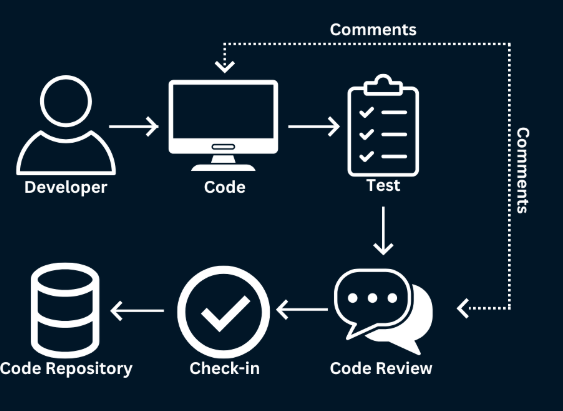
It works across multiple platforms including web browsers, VS Code, mobile apps, and its own dedicated IDE. This flexibility means you can access AI coding help wherever you work.
The real game-changer is its access to 300+ AI models. This includes top models like Claude, GPT-4o, Gemini, and DeepSeek, all under one subscription.
Key Features of Blackbox AI
1. AI Code Generation
Blackbox AI excels at turning your ideas into working code. Just describe what you need, and the AI writes it for you.
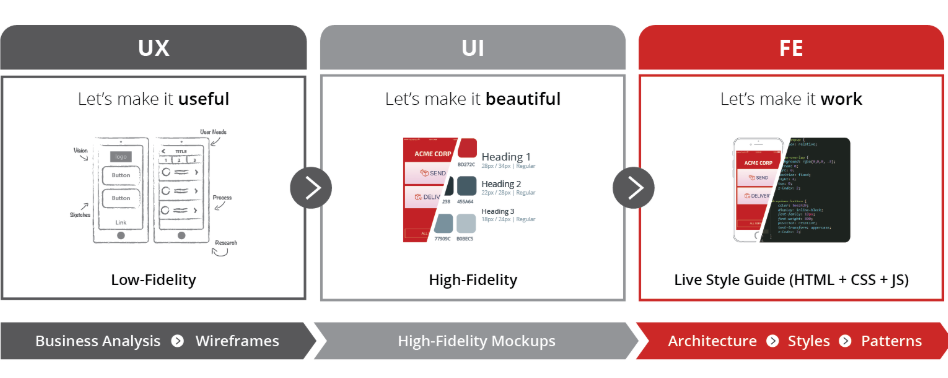
The system understands context from your project. It doesn’t just guess—it analyzes your existing code, imported libraries, and coding patterns to provide relevant suggestions.
This feature supports 20+ programming languages including Python, JavaScript, TypeScript, Java, C++, Ruby, Go, and more.
2. Smart Code Autocomplete
As you type, Blackbox predicts what comes next and suggests complete code blocks. This isn’t basic word completion—it can suggest entire functions and complex logic.
The autocomplete feature learns from your coding style over time. The more you use it, the better it gets at understanding your preferences.
With 3.96 million installs, the VS Code extension has become one of the most popular AI coding tools available.
3. CyberCoder Autonomous Agents
This is where Blackbox AI really stands out. CyberCoder can handle complete tasks without constant hand-holding.
You give it a high-level goal like “implement user authentication” and it breaks down the task, writes code across multiple files, runs tests, and fixes errors automatically.
The October 2025 update introduced multi-agent parallel execution. Multiple AI agents work on the same task simultaneously, and an AI judge picks the best solution.
4. Image-to-Code Conversion
Got a screenshot or design mockup? Blackbox can turn it into working code. This feature is incredibly useful for frontend developers working with Figma designs or UI sketches.
The OCR technology extracts code from images and documentation, making it easy to learn from tutorials or convert visual designs into functional websites.
5. Multi-Model Access
Unlike tools that lock you into one AI model, Blackbox gives you access to 300+ models. You can switch between different AI engines depending on your needs.
Need fast code generation? Use one model. Need careful debugging? Switch to another. This flexibility is rare in the AI coding space.
6. Mobile Apps
Blackbox is the only mainstream AI coding assistant with dedicated mobile apps for iOS and Android. This means you can code on the go, review code during commutes, or assign tasks to agents remotely.
The mobile apps include voice interaction for hands-free coding, full chat history synchronization, and access to autonomous agents.
7. Web-Based IDE
You don’t need to install anything to start coding. Blackbox provides a full web-based development environment where you can build, test, and deploy applications.
This is perfect for quick prototypes or when you’re working on a device that doesn’t have your usual setup.
Blackbox AI Pricing Plans (2026)
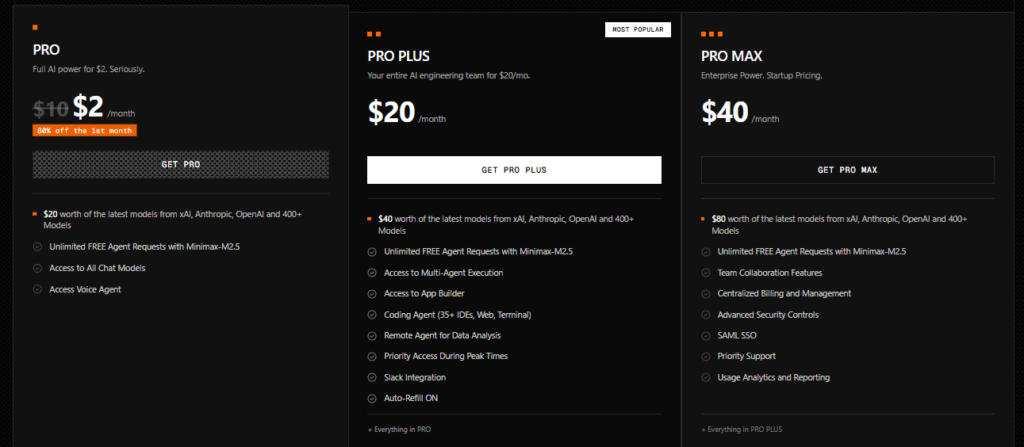
Understanding the pricing is crucial before committing to any tool. Here’s what Blackbox AI offers:
Free Plan
The free tier includes unlimited chat with basic AI models like DeepSeek and basic code autocomplete features.
However, daily usage limits mean you’ll hit restrictions during longer coding sessions. It’s good for testing the platform but limited for serious development work.
Pro Plan ($8/month or $6.67/month billed yearly)
This is where real value begins. You get access to all 300+ AI models, autonomous coding agents, and significantly higher usage limits.
For individual developers, this plan offers excellent value compared to competitors.
Pro Plus Plan ($16/month)
Everything in Pro plus the App Builder, multi-agent execution (multiple agents working simultaneously), and broader IDE support.
This plan is ideal for developers working on multiple projects or larger-scale applications.
Pro Max/Business Plan ($40/month)
Designed for teams and businesses, this tier includes unlimited agent requests, SAML SSO, advanced security controls, centralized billing, priority support, and usage analytics.
Enterprise plans offer on-premise deployment options with full data sovereignty, allowing companies to run Blackbox within their own infrastructure.
Volume Discounts
Teams of 10+ seats can contact sales for custom enterprise pricing with volume discounts.
Pros of Blackbox AI
✅ Affordable Pricing
Starting at just $8 per month for the Pro plan, Blackbox AI is significantly cheaper than many competitors. GitHub Copilot costs $10/month but only offers one AI model.
The value-to-price ratio is impressive. You’re getting access to hundreds of AI models at a fraction of what you’d pay for multiple subscriptions.
✅ Multiple AI Models
Access to 300+ models means you can choose the best tool for each task. Different models excel at different things—some are better at code generation, others at debugging.
This flexibility eliminates the need for multiple AI subscriptions, saving both money and time.
✅ Autonomous Agents
CyberCoder agents can handle entire features from start to finish. This goes far beyond autocomplete—you’re delegating real work to AI.
For routine tasks like generating test cases or refactoring code, this feature is a massive time-saver.
✅ Generous Free Tier
Unlike many competitors, Blackbox offers a functional free plan. This makes it accessible for students, beginners, and developers in emerging markets.
You can test the platform thoroughly before upgrading to a paid plan.
✅ Mobile Support
Being able to code from your phone or tablet is unique in this space. Whether you’re reviewing code on the go or assigning tasks remotely, the mobile apps add real flexibility.
✅ Fast Code Generation
For scaffolding new projects, generating boilerplate code, and writing unit tests, Blackbox is exceptionally fast.
Many users report significant productivity gains, especially on repetitive coding tasks.
✅ Image Recognition
The image-to-code feature is genuinely useful for frontend development. Converting Figma designs or screenshots directly into code saves hours of manual work.
Cons of Blackbox AI
❌ Inconsistent Code Quality
While great for simple tasks, Blackbox can struggle with complex, multi-file changes. The code quality varies depending on the complexity of the request.
You’ll need to review everything carefully before using it in production. It’s a helpful assistant, not a replacement for careful code review.
❌ Cloud Dependency
All processing happens in the cloud. If your internet drops or Blackbox servers have issues, you’re stuck.
There’s no offline mode or local fallback, which can be frustrating during connectivity problems.
❌ Customer Support Issues
Several users have reported difficulties with customer support and cancellation processes. Response times can be slow, and resolving subscription issues may require persistence.
❌ Limited Pricing Transparency
The exact usage limits and credit allocations aren’t always clearly documented. Pricing has changed multiple times, and the official site doesn’t always specify exact restrictions.
This lack of transparency can be frustrating when trying to budget or plan team usage.
❌ Learning Curve
Despite being beginner-friendly in marketing, Blackbox has a steeper learning curve than expected. Understanding how to best use autonomous agents and multiple models takes time.
❌ Code Review Still Required
The autonomous agents can miss details on complex tasks. You can’t blindly trust the output—careful review is mandatory for production code.
Blackbox AI vs GitHub Copilot
This is the comparison most developers want to see. Both tools aim to accelerate coding, but they take different approaches.
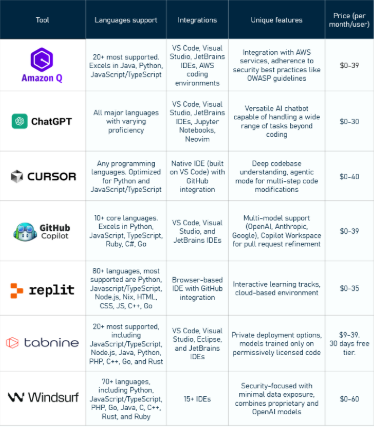
Pricing Comparison
- Blackbox AI: $8/month (Pro), $16/month (Pro Plus)
- GitHub Copilot: $10/month (Individual), $19/month (Business)
Blackbox offers more features at a lower entry price, but Copilot has more consistent code quality.
Model Access
- Blackbox AI: 300+ models (Claude, GPT-4o, Gemini, DeepSeek, etc.)
- GitHub Copilot: Primarily uses GPT-4o with some access to other models
Blackbox wins on variety and flexibility. Copilot focuses on depth with fewer models.
Code Quality
GitHub Copilot generally produces more reliable, production-ready code with fewer bugs. The suggestions are more consistent and require less debugging.
Blackbox offers faster code generation but with more variability in quality. Complex tasks may require additional review.
Unique Features
- Blackbox: Mobile apps, image-to-code, autonomous agents, 300+ models
- Copilot: Deeper GitHub integration, more stable output, better documentation
Which Should You Choose?
Choose Blackbox AI if you:
- Want to experiment with multiple AI models
- Need mobile coding capabilities
- Work with lots of boilerplate code
- Want image-to-code features
- Prefer a lower monthly cost
Choose GitHub Copilot if you:
- Need consistently reliable code
- Work heavily within the GitHub ecosystem
- Prefer stable, well-documented tools
- Want minimal debugging overhead
- Need production-ready code output
For many developers, using both tools strategically makes sense. Use Blackbox for quick prototyping and boilerplate, and Copilot for production code.
Who Should Use Blackbox AI?
Perfect For:
Students and Beginners: The free tier and affordable pricing make it accessible for learning. The AI can explain code and help understand programming concepts.
Freelance Developers: Budget-conscious freelancers who need powerful AI assistance without breaking the bank will find excellent value here.
Frontend Developers: The image-to-code feature is particularly valuable for converting designs into functional code quickly.
Multi-Language Developers: If you work across many programming languages, having one tool that handles them all is convenient.
Rapid Prototypers: When you need to build something quickly, Blackbox’s speed is hard to beat.
Not Ideal For:
Mission-Critical Production Code: The inconsistency in code quality makes it risky for critical systems without extensive review.
Teams Needing Reliable Support: The customer support issues can be problematic for businesses that need quick resolution.
Developers Wanting Offline Tools: The cloud-only approach won’t work for those needing offline coding capabilities.
Enterprise Teams Without Patience: The learning curve and occasional quirks may frustrate teams looking for plug-and-play solutions.
Is Blackbox AI Safe and Legit?
Yes, Blackbox AI is a legitimate platform used by millions of developers worldwide. It’s not a scam.
The company offers end-to-end encryption for Pro Plus plans and above. Enterprise plans include advanced security controls, SAML SSO, and on-premise deployment options.
However, as with any cloud-based tool, avoid sharing extremely sensitive proprietary code. Choose enterprise plans if you need maximum security and data sovereignty.
The platform complies with standard security practices, but review your company’s security policies before using it for confidential projects.
Real-World Use Cases
Code Learning and Education
Students use Blackbox to understand complex code. Highlight any function and click “Explain Code” to get a detailed breakdown of how it works.
This accelerates learning curves significantly, especially for Python and JavaScript beginners.
Legacy Code Modernization
Converting old COBOL or outdated JavaScript to modern frameworks is painful. Blackbox can help translate legacy code to contemporary languages.
Banks and enterprises have used this feature to modernize mainframe code for cloud scalability.
Rapid Application Development
Building a minimum viable product quickly becomes easier with autonomous agents. Describe your app, and let CyberCoder handle the scaffolding.
This is particularly effective for web apps using React, Node.js, and PostgreSQL.
API Development
Generating REST APIs with proper error handling and authentication is time-consuming. Blackbox speeds this up significantly.
Test Case Generation
Writing unit tests is tedious but necessary. Blackbox can generate comprehensive test suites based on your existing code.
Tips for Getting the Most from Blackbox AI
- Be specific with prompts: The more detailed your description, the better the output. Instead of “create a login form,” try “create a responsive login form with email validation using React and Tailwind CSS.”
- Review everything: Never trust AI-generated code blindly. Always review and test before deploying.
- Use the right model: Experiment with different AI models for different tasks. Some excel at specific languages or tasks.
- Leverage image-to-code: If you’re working with designs, upload screenshots to save time on frontend work.
- Start with the free tier: Test thoroughly before committing to a paid plan.
- Combine with other tools: Use Blackbox alongside traditional debugging tools and code review practices.
Final Verdict
Blackbox AI delivers impressive value, especially considering its pricing. The access to 300+ AI models, autonomous agents, and unique features like image-to-code make it stand out in a crowded market.
However, it’s not perfect. Code quality inconsistencies, cloud dependency, and customer support issues are real concerns.
Overall Rating: ⭐⭐⭐⭐ (4/5)
Best for: Developers who want speed, variety in AI models, and budget-friendly pricing. Students, freelancers, and frontend developers will find particular value.
Not ideal for: Teams needing enterprise-grade reliability without extensive code review, or developers requiring offline functionality.
Bottom Line
Blackbox AI is a powerful productivity tool when used correctly. Treat it as an intelligent assistant that accelerates your work, not as a replacement for coding skills.
At $8/month, the risk is low enough to try. The free tier lets you test it risk-free before committing.
For developers looking to experiment with cutting-edge AI coding features without spending a fortune, Blackbox AI is absolutely worth exploring in 2026.
Frequently Asked Questions (FAQs)
Is Blackbox AI completely free?
No, while Blackbox offers a free tier with unlimited chat and basic features, professional capabilities require paid plans starting at $8/month. The free plan has daily usage limits that restrict longer coding sessions.
Is Blackbox AI better than GitHub Copilot?
It depends on your needs. Blackbox offers more models and features at a lower price, while Copilot provides more consistent code quality. If you want variety and affordability, choose Blackbox. If you need reliability and GitHub integration, choose Copilot.
Can complete beginners use Blackbox AI?
Yes, but there’s a learning curve. The AI can explain code and help with syntax, making it useful for learning. However, beginners should focus on understanding fundamentals rather than relying solely on AI-generated code.
Does Blackbox AI replace human developers?
No. It’s an assistant that speeds up coding, not a replacement. You still need programming knowledge to review code, make architectural decisions, and solve complex problems.
What programming languages does Blackbox AI support?
Blackbox AI supports 20+ programming languages including Python, JavaScript, TypeScript, Java, C++, C#, Ruby, Go, PHP, Swift, Kotlin, Rust, Scala, R, SQL, HTML/CSS, Shell/Bash, and Dart.
Can I use Blackbox AI offline?
No, Blackbox AI is entirely cloud-based and requires an internet connection to function.
Is my code safe with Blackbox AI?
Blackbox AI uses encryption for data transmission. Pro Plus and higher plans include end-to-end chat encryption. Enterprise plans offer on-premise deployment for complete data sovereignty. However, avoid sharing extremely sensitive code on lower-tier plans.
Can I cancel my Blackbox AI subscription?
Yes, you can cancel, though some users have reported difficulties with the cancellation process. Keep documentation of your cancellation request and follow up if needed.
Does Blackbox AI work with VS Code?
Yes, Blackbox has a popular VS Code extension with 3.96 million installs. It also integrates with 35+ other IDEs including PyCharm, IntelliJ, Android Studio, and Xcode.
How accurate is the code generation?
Accuracy varies by task complexity. Simple functions and boilerplate code are usually accurate. Complex, multi-file changes may require significant review and debugging.
Ready to try Blackbox AI? Start with the free tier to see if it fits your workflow. The low-risk entry point makes it easy to explore without financial commitment.
Remember: AI coding tools are here to augment your skills, not replace them. Use Blackbox AI wisely, review all generated code carefully, and keep learning to stay ahead in the ever-evolving world of software development.
